Add a third-party API
Add your own provider with its endpoint, API Key, protocol, and supported models.
Bring an API you already purchased from another provider, or your own compatible service, into your existing workflow. That provider determines model availability, permissions, and billing.
Steps
- Open Model List and choose + Add provider under custom providers
- Enter the provider name, Base URL, and API Key supplied by the service
- Choose Responses (/responses) or Chat Completions (/chat/completions) according to the provider's documentation. Do not infer the protocol from a model name
- Sync the model list, or use Add model with a supported model ID. Initial example models do not establish what the provider supports
- Use the model row's connection check and save name or model edits. Connection fields save automatically; saving is not the same as switching the active connection
- Complete any apply or switch confirmation, then choose the provider and model in Codex. Save your work before any requested restart
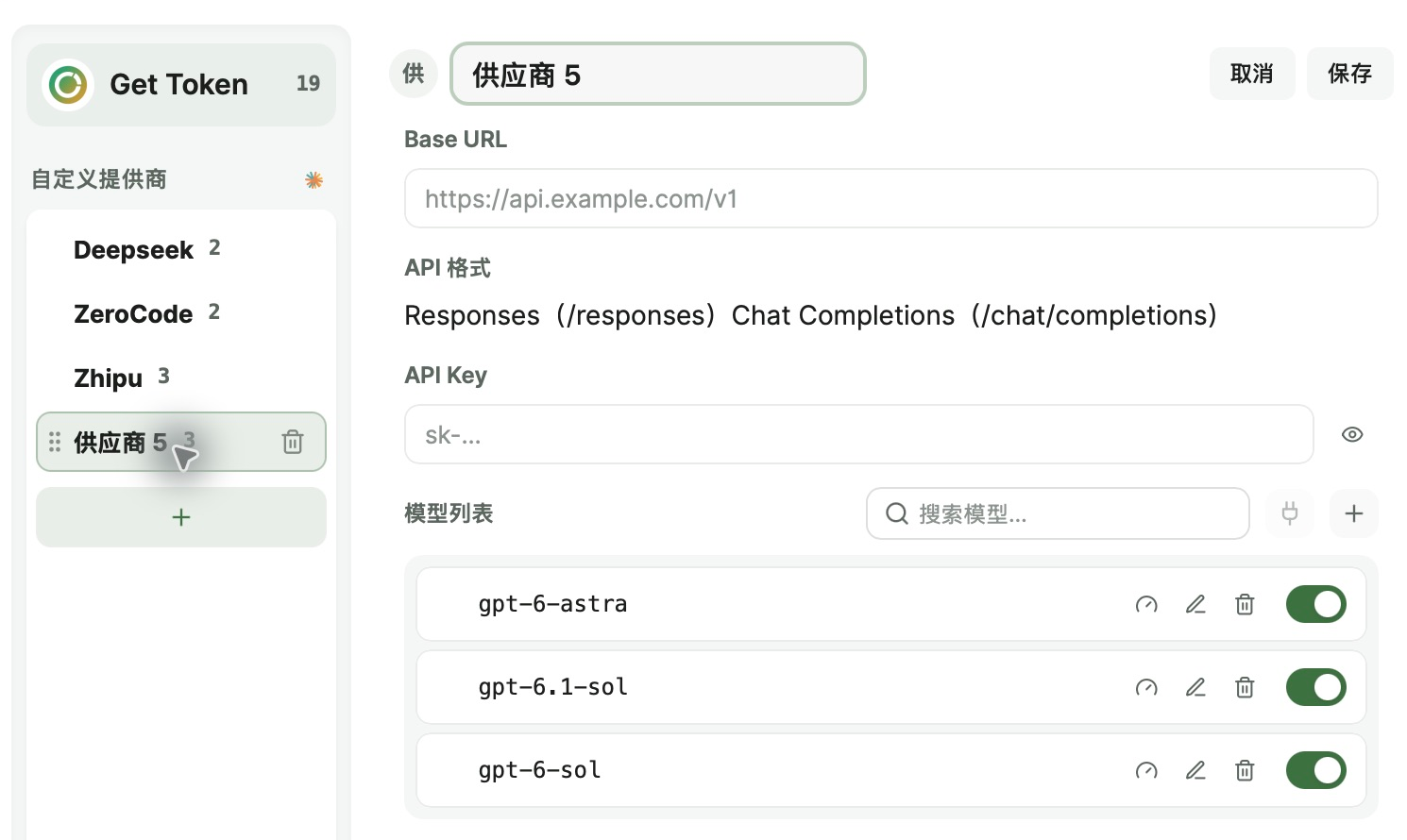
For example, an existing DeepSeek API Key can be added as a separate provider while you keep working in the same project. Usage is billed by the selected provider. For Claude Code, also confirm compatibility with Claude's connection method and apply to the intended desktop or CLI target separately. A working Codex configuration does not establish that Claude is configured.
Troubleshooting
Why does a saved third-party API still fail?
Check the Base URL, API Key, protocol, and actual model ID, then run the connection check. Initial example models may be unsupported. Saving and applying are separate: finish the apply or switch step and verify the intended Codex or Claude target.